
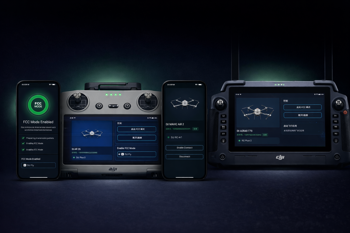
NLD FCC for Android is finally here!
It is built to make FCC activation fast, simple, and repeatable. Since FCC Mode must be applied every time the drone boots, this is not a one-time utility. It is part of the real pre-flight flow.
Open NLD FCC, enable FCC Mode, then launch your installed flight app directly from within the app and fly.
That is also what makes NLD FCC different. Most FCC tools feel rough and improvised. NLD FCC is built like a proper user product: cleaner flow, better usability, and less friction every time you fly.
NLD FCC is fully translated into all 82 Android-supported languages, so users can read it, trust it, and use it in their own language instead of guessing their way through it.
It is designed to work broadly across DJI setups rather than only on a narrow list of specific combinations. It has worked with every supported drone we have tested so far, and if a specific drone, controller, and flight app combination behaves differently, those cases are usually fixable.
NLD FCC also supports the connection methods DJI users actually run into in the real world, including normal phone and tablet workflows, DJI remotes with built-in screens, direct USB connection, and legacy USB serial support for older hardware.
NLD FCC for Android is available now!
Built to create lift, not drag.
Explore NLD FCC for Android